Blog
MHEG-5 Madness
22 November 2025
It's no secret that MHEG-5 content is sharply decreasing on UK TV. I previously went through some interesting data-only channels in my blog a few years ago (The Red Zone), but nowadays there's not a lot to see.
There's a few reasons for this. The first is, MHEG-5 support is no longer required for new TVs and tuners sold in the UK. The second is, there's a replacement standard - HbbTV. This means that we're in a transitional time, where both technologies are provided on most channels for compatibility.
BBC
Take the BBC. They were among the first proponents of the MHEG-5 standard, and used it exclusively for interactive TV until about 2017. They did eventually yield to HbbTV, and now there are two Red Button services: the old MHEG-5 one, which contains news and weather reports mirrored from their website, and the "new" Red Button, which basically only links you to BBC iPlayer or BBC Sounds for the programme being broadcast.


Still working in 2025! © BBC
Speaking of the old Red Button, they've been cutting it back ever since they announced they were removing it entirely. It's clearly unmaintained, because its data carousel still contains 5 year old lottery numbers. Note that the lottery numbers section was removed in 2020.
Winning Numbers 23 32 37 49 54 57
Excerpt from the file
They did add a new feature last year though, a daily number puzzle. It isn't really as interactive as it could be (you just switch pages to see the answer), but it does amuse me that there was demand for this.
So who else still uses MHEG-5?
TV Panel
TV Panel collects TV viewing figures - who watched what programmes at certain times of the day, etc. This is similar to what Barb does in the UK, and Nielsen in the USA.
They use an MHEG-5 application that runs on some channels to collect this data. It is opt-out (press YELLOW to do so), and apart from an information screen that appears on the first load, is mostly invisible to the viewer.
However, press BLUE or TEXT ten times in a row on any of the channels that use it, and you'll get this lovely blue log screen:
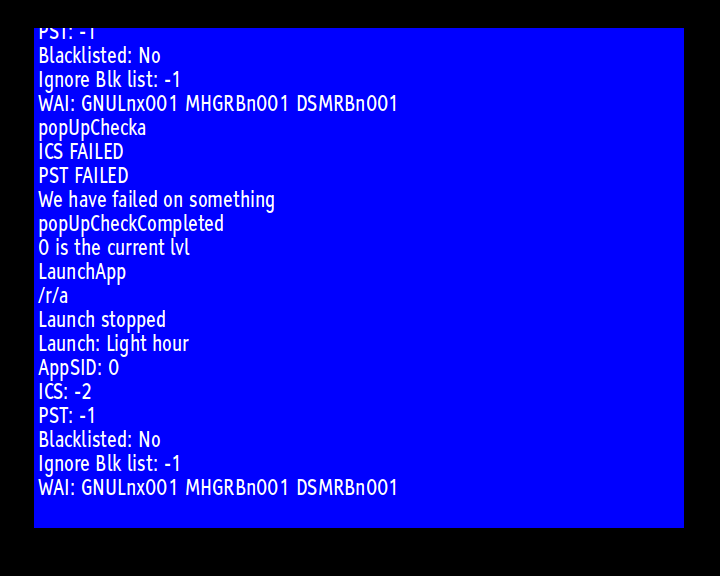
In the screenshot, you can see that the application didn't start for me. That's because it needs an internet connection to report the figures, and persistent storage to allow it to uniquely identify your TV each time is switched on.
Hopefully their APIs can't be abused in some way to inflate the viewing figures of notorious channels.
SmileTV 3 / Babestation X
Remember Television X, the adult content channel? It's been gone for ages now, but BSX follows it in a similar fashion - they use MHEG-5 to provide a PPV service. When the channel is broadcasting, you can (somewhat) anonymously purchase a unique PIN code to gain access to the content.
When it's off-air, there is just a placeholder screen (more about those shortly). However, theirs is special in that there are two secret functions you can access with the correct combination of buttons.
Press TEXT, BLUE, YELLOW, GREEN and RED, and you'll gain access to their PIN test screen.
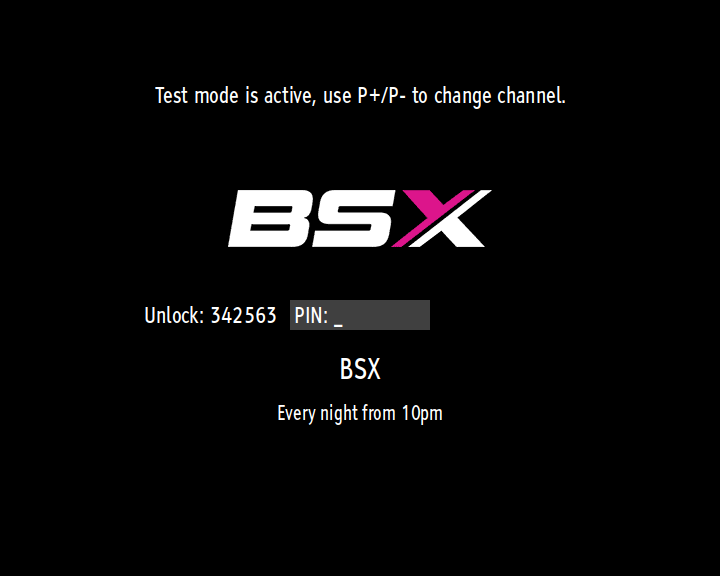

No, this won't let you bypass the PIN!
The other secret function is accessed by pressing YELLOW three times. This will show you your TV tuner's model ID.
QVC
QVC still makes use of MHEG-5 for their interactive shopping service. There is a gotcha though - the product data is downloaded from the internet, so your TV must be connected for this to work. Otherwise, you just get told to plug it in.
IPTV Channels
There are a few channels that don't receive video data from the transmitter, but stream it from the internet instead. These are considerably cheaper for the channel operator, yet still give them a similar audience reach.
The most common MHEG-5 application for facilitating IPTV appears to be S&T's Player, last updated in 2016. It operates in two parts: a stub application checks to see if you have an internet connection by trying to download the main player component. If that succeeds, the player itself uses a configuration file to download a placeholder logo and then the video stream itself.

If it fails, you just get a small notice.
Radio and Off-Air Screens
Radio channels don't broadcast video, so they usually use a logo and some text. The data stream for these channels is typically very slow, around 1kbps.
Here are a couple examples:


© Capital Radio 2025 and © RNIB 2025.
Some channels don't broadcast 24 hours a day. When they're off-air, they show a placeholder screen to let you know when they'll be back.
There's nothing particularly special about them, but I wanted to show the difference between an MHEG-5 generated screen, and an HbbTV one:


MHEG-5 on the left (stretched to widescreen), HbbTV on the right. © ITV 2025.
All the radio channels and off-air TV channels now have HbbTV applications, so there are no worries to owners of brand new TV sets.
End
I think MHEG-5 support is close to the end in the UK. As existing TVs and tuners wear out and get replaced, there will be a pivot point where it's easy to argue for removing them. I reckon the BBC's Red Button service will go first.
It's harder to tell if broadcasting over the air will cease. It's still more efficient than sending the same data across the internet multiple times, but as connection speeds increase, that might not be a concern.
2026
2025
2024
2023
2022
2021
2020
- Captain Blood (Amstrad CPC)
- Photoshop 7: The Disk is Full
- Networking Headaches I
- Installing OpenWRT on a TP-Link TD-W8970
- Basilisk II in... The Longest Double
- Lenovo Mobile Services
- The Apprentice (Amstrad CPC)
2019
- Storm (Amstrad CPC)
- Forgotten Spreadsheet Programs for Windows
- Adventures in Teletext Recovery
- ITV Nightscreen
- Datasoft Saracen
2018
- CPC Game Musings I
- WineVDM Update & Win3mu
- SwiftShader on Windows 98
- Mijenix ZipFolders
- Amstrad CPC Maps
- Microsoft WinG
- Fonts in Old Versions of Windows
- WineVDM
- Microsoft Windows NT 3.51 Compatibility
- OU: Living With Technology T102
- The MS-DOS Program Within Windows Programs
- Early Versions of PKZip for Windows
- Compiler Bloat?
- Remembering RealPlayer
- The James Pond 3 F.I.5.H. Code
- Microsoft Binder
- U/Win: UNIX Commands on Windows 3.0
- Exploring Enhanced CDs
- Cheating in Indy Jones' Desktop Adventures
- Microsoft Word Viewer
- Weirdness with Simply Red's "A New Flame"
© Andrew Nile 2018-2026. Privacy